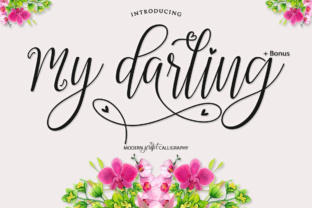
My Darling: A Modern Script Font That Brings Personality to Every Project
If you have ever spent hours scrolling through font libraries, looking for something that feels both polished and personal, you already know how rare that combination is. Most script fonts lean one way or the other—either they look like they were drawn with a shaky hand on a napkin, or they are so rigid they might as well be a standard serif. My Darling lands somewhere much more interesting. This modern script font comes with 817 unique glyphs, each one handcrafted and then refined digitally, so you get the warmth of human lettering without the unpredictability. It also includes a decorative bonus script, which adds even more room to play. But numbers and technical specs only tell part of the story. What really matters is how this typeface behaves in the real world, across different projects, industries, and creative goals.
The Difference Between a Font and a Tool That Works for You
It is easy to think of a font as just another file you install and forget. But anyone who has ever tried to make a wedding invitation, a product label, or even a personal blog header knows that the wrong typeface can kill the whole mood. My Darling is not just a set of letters—it is a system of expressive characters that feel intentional. The 817 glyphs include alternate forms, swashes, ligatures, and extended language support, which means you are not stuck with the same default look for every word. For instance, if you are designing a logo for a boutique bakery, you can use the decorative bonus script to add a flourish on the word "fresh," then switch to the main script for the rest of the tagline. That kind of flexibility is rare in a single font package.
What stands out most when you start using it is how naturally the letters flow together. Because the font was hand-drawn first, the spacing and connections between characters feel organic. This matters a lot when you are working on longer text, like a quote for a wall print or a paragraph on a product package. Many script fonts break apart visually when you set more than a few words, but My Darling keeps its rhythm. You do not have to manually kern every pair of letters to make it look good—it works right out of the box.
Wedding Stationery and Event Branding
Weddings are one of the most common use cases for script fonts, but they are also one of the most demanding. Couples want everything to feel cohesive, from the save-the-dates to the thank-you cards. My Darling works particularly well here because it offers enough variety within a single family. You can set the main invitation text in the standard script, use the decorative bonus for the couple's names, and rely on the alternate glyphs to give each piece a slightly different look without switching to a second font. Save-the-dates can feel playful with a few swashes, while the ceremony program stays elegant and readable. For event planners or couples doing their own design, this reduces the headache of matching multiple fonts across different printed pieces.
Product Packaging and Small Business Branding
Small businesses, especially in food, beauty, and lifestyle categories, often struggle to stand out on crowded shelves. A font like My Darling can become a core part of the visual identity. Imagine a small-batch hot sauce brand using the script for the label—the handcrafted feel communicates craft and care, while the clean digital optimization ensures the text remains legible at small sizes. Because you have so many glyphs to choose from, you can create a logo that no one else has. The decorative bonus script can be used for a tagline or a secondary element like "est. 2023." For makers who sell on Etsy or at farmers' markets, this kind of differentiation is valuable without requiring a full design degree.
Social Media Graphics and Digital Content
Even though My Darling was handcrafted, it was also digitally optimized, which means it renders beautifully on screens. Content creators, influencers, and small marketing teams can use it for Instagram quotes, YouTube thumbnails, or Pinterest pins. The key here is that the font does not get muddy at low resolutions or small sizes, which is a common issue with overly ornate scripts. A lifestyle blogger might use the standard script for headlines in a video and the bonus script for a call-to-action overlay. The natural flow of the letters makes the text feel less like a graphic element and more like a handwritten note—something that resonates with audiences tired of overly polished corporate aesthetics.
Different Users, Different Benefits
Not everyone who downloads My Darling will use it the same way, and that is exactly why it works. A graphic designer working on a branding project will appreciate the sheer number of glyphs and the ability to customize every word. A hobbyist making a family newsletter will value how easy it is to get a professional result without spending hours tweaking settings. A wedding planner might rely on the font to create consistent materials for multiple clients without starting from scratch each time. Even a teacher putting together a classroom poster can use the decorative script to add visual interest without needing illustration skills.
What ties these different users together is the desire for something that feels personal without being sloppy. My Darling offers that balance. The hand-drawn quality adds humanity, while the digital refinement removes the awkwardness that sometimes comes with purely manual fonts. For someone who does not have a background in typography, this means less trial and error. For a seasoned designer, it means a reliable tool that does not need constant correction.
Practical Considerations Before Using My Darling
No font is perfect for every situation, and being honest about that helps you get better results. Because My Darling is a script font with considerable detail, it is not the best choice for long body text in a book or a lengthy report. It is designed to be seen, not skimmed. If you use it for a paragraph longer than a few lines, readability can drop, especially at smaller sizes. Stick to using it for headlines, short phrases, logos, and decorative elements where its personality can shine.
Another thing to keep in mind is that the decorative bonus script, while beautiful, is best used sparingly. It adds flair, but too much on one page can feel busy. A good rule of thumb is to let the bonus script handle one or two key words and use the main script for the rest. This creates a natural hierarchy without overwhelming the viewer.
File format and software compatibility are also worth checking. Most modern design tools handle Opentype fonts well, but if you are working in a program that does not fully support advanced glyph features, you might not be able to access all 817 characters. Before committing to a large project, open My Darling in your software and test a few words to see which alternates are available. This small step can save frustration later.
Strengths That Make It Stand Out
The biggest strength of My Darling is its versatility within a single family. You get a complete script, a decorative bonus, and hundreds of alternates, which means you can create a cohesive look across multiple pieces without juggling different fonts. The handcrafted origin gives it warmth, and the digital optimization keeps it functional. For anyone who has ever tried to make a script font work for both a logo and a social media graphic, this flexibility feels like a relief.
The extended glyph set also means better language support, which is important if you are designing for an international audience or need to include accented characters. It is a practical advantage that often gets overlooked until you suddenly need a special character and realize your chosen font does not have it.
Limitations to Keep in Mind
On the flip side, the same detail that makes My Darling beautiful can also make it less suitable for certain minimalist or ultra-modern projects. If you are going for a stark, geometric look, a script font with swashes will feel out of place. Context matters. Also, because the font includes so many glyphs, the file size is larger than a basic sans-serif. This is rarely an issue for print work, but if you are embedding the font in a digital document or a web project, you might notice slower loading times. For most users, this is a minor trade-off, but it is worth knowing ahead of time.
Another practical point: if you are not experienced with using Opentype features, you might not get the full value of My Darling right away. Learning how to access alternate glyphs and ligatures in your design software takes a few minutes, but it is not automatic in every program. Taking that time to explore what the font can do will make a noticeable difference in your final output.
Bringing It All Together
My Darling is more than a collection of letters—it is a resource for anyone who wants their projects to feel intentional, personal, and visually engaging. Whether you are designing a wedding suite, building a brand for a small business, creating social media content, or simply experimenting with typography for your own enjoyment, this font gives you room to express without fighting the tool. The handcrafted roots and digital polish work together to produce something that reads clearly and feels human. And with the decorative bonus script tucked in as an extra, you have even more ways to make your work stand out.
If you are the kind of person who notices when a font feels wrong but cannot always explain why, My Darling offers a solution that feels right from the first word you type. It does not try to be every font at once. Instead, it focuses on being excellent at what a script font should do: add warmth, character, and a touch of elegance to the words that matter most.