Joy Flight: A Handcrafted Font Built for Real Workflows
Typography is one of those quiet forces in design—it shapes tone, guides attention, and often determines whether a message lands or gets lost. When you’re working on a project that needs personality without sacrificing readability, the choice of typeface becomes a practical decision as much as a creative one. Joy Flight, a handcrafted font created by Creativeqube, sits at that intersection: it’s expressive enough to stand out, yet structured enough to integrate into everyday work. This article walks through what Joy Flight is, where it belongs in a project timeline, how it interacts with other tools and assets, and how to put it to use without overcomplicating your process.
What Joy Flight Brings to the Table
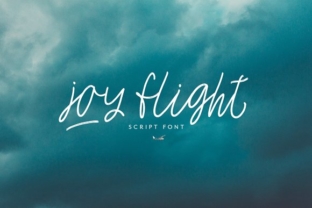
Joy Flight is a display-oriented typeface with a handcrafted aesthetic. Its letterforms carry the warmth of manual drawing—slight irregularities in stroke weight, organic curves, and a sense of movement that feels human rather than mechanical. That makes it a strong candidate for headlines, branding elements, packaging, social media graphics, and any space where you want to convey energy, approachability, or a crafted feel.
But don’t mistake “handcrafted” for “unusable in serious contexts.” The font has been built with enough consistency to work across multiple sizes and mediums, which is exactly what you need when you’re managing a project from concept to final delivery. It’s not a novelty font—it’s a tool with a specific job.
Where Joy Flight Fits in a Project Timeline
One of the most practical questions you can ask about any asset is: when do I reach for it? Joy Flight tends to be most useful during specific phases of a project, and understanding those phases helps you plan ahead instead of scrambling for typography at the last minute.
Before the Project: Setting the Tone
If you’re in the planning or concept stage, Joy Flight can help you define a visual direction early. When you’re putting together mood boards, initial mockups, or style tiles, dropping in a headline set in Joy Flight gives you an immediate sense of the emotional register you’re aiming for. Is this project casual, friendly, or energetic? The font answers that question faster than most. You can test it against color palettes, photography, and layout grids before committing to a full design system.
For team collaborations, sharing a preliminary visual with Joy Flight in place helps everyone align on the intended vibe. It reduces the back-and-forth that happens when the tone isn’t yet clear.
During the Project: Execution and Production
Once you’re in the middle of production, Joy Flight functions best as a display face—use it for headlines, subheadings, pull quotes, or hero text. Pair it with a neutral, highly readable body typeface (like a clean sans-serif or a classic serif) to balance personality with functionality. The contrast lets Joy Flight shine without overwhelming the reader.
If you’re working on a brand identity, Joy Flight can anchor the logotype or appear in secondary branding elements. In web design, it works well for hero section headers, call-to-action buttons, or marketing banners—anywhere you need impact in a compact space. Just be mindful of legibility at small sizes; the handcrafted details are best appreciated at medium to large scales.
After the Project: Delivery and Iteration
After a project ships, you might need to produce variations—social media posts, email headers, event graphics, or printed collateral. Joy Flight’s consistency across formats means you can reuse the same typeface without rethinking the design. This saves time and maintains brand cohesion. If you’re handing off files to a client or a developer, including a usage guide for Joy Flight (recommended sizes, pairings, color treatments) ensures the font continues to work correctly long after you’ve moved on.
How Joy Flight Interacts with Other Tools and Assets
No typeface operates in isolation. Joy Flight fits into a broader ecosystem of design software, asset libraries, and workflow methods. Here’s how it typically connects:
- Design software: Joy Flight works across major applications—Adobe Illustrator, Photoshop, InDesign, Figma, Sketch, and Affinity products. It installs as a standard OTF or TTF file, so compatibility is rarely an issue. In vector-based tools, you can tweak letter spacing, adjust kerning, or convert text to outlines for custom modifications.
- Asset management: Keep Joy Flight in a centralized font library (like a cloud-based service or a local folder with clear naming). If you’re part of a team, standardizing font usage prevents duplicate purchases and inconsistent application.
- Pairing strategies: Joy Flight pairs well with minimal sans-serifs (e.g., Open Sans, Inter, or Montserrat) and simple serifs (like Lora or DM Serif Display). Avoid pairing it with other heavily decorated typefaces—the competition creates visual noise. A good rule is to use Joy Flight for emphasis and let your secondary font handle the body copy.
- Color and texture: Because Joy Flight has a hand-drawn quality, it responds well to textured backgrounds, subtle gradients, or monochromatic palettes. Experiment with opacity, overlays, or letterpress effects in print to enhance the crafted feel.
Practical Implementation Tips
Integrating a new typeface into your workflow should feel straightforward, not disruptive. Here are specific, actionable tips for getting the most out of Joy Flight without adding friction.
Preparation and Sizing
Before you start a layout, define the size ranges where Joy Flight will appear. For headlines, aim for 36pt to 72pt or larger, depending on the medium. For subheadings, 24pt to 36pt usually works. Avoid using Joy Flight for body text below 16pt—the handcrafted details can become muddy, and readability suffers. Create a typographic scale in your design file so you can apply consistent sizes from the start.
Compatibility Checks
If you’re designing for the web, check how Joy Flight renders across browsers and operating systems. Use web font formats (WOFF2) and include fallback fonts in your CSS. For print, ensure the font is embedded in your PDFs or outline the text if you’re sending files to a printer. A quick test print at actual size can save you surprises later.
Usability in Workflows
For teams, create a shared style guide that includes Joy Flight usage rules. Specify where it should be used (headlines, logos, accent text) and where it should not (body copy, captions, footnotes). This prevents misuse and maintains a consistent brand voice. For solo creators, a simple note file next to your design templates will serve the same purpose.
Quality Control Across Formats
When you export files—whether for social media, a website, or a printed brochure—review the typography at actual output size. Zoom in to check for unexpected kerning issues, especially in large headlines. Because Joy Flight is handcrafted, some letter pairs may need manual kerning adjustments in your design software. This is normal and worth the extra minute.
Workflow Examples for Different Roles
Joy Flight adapts to different contexts. Here are three realistic scenarios showing how it integrates into real work.
For a Freelance Brand Designer
You’re building a visual identity for a small coffee roastery. In the discovery phase, you use Joy Flight to sketch logotype options and test them against mood board images. Once the client approves the direction, you pair Joy Flight with a sturdy sans-serif for packaging labels and website headings. You export a brand guide that includes the font’s size specs and pairing recommendations, making the handoff clean. Long term, you keep Joy Flight in your active font library for future food-and-beverage projects that need a handcrafted feel.
For a Marketing Team Producing Social Content
Your team manages five brand accounts, and you need a consistent headline style across platforms. You set Joy Flight as the primary headline font for Instagram stories, LinkedIn banners, and email headers. By creating reusable templates in Canva or Figma with Joy Flight pre-loaded, you reduce production time. The font’s distinct look helps your content stand out in crowded feeds without requiring complex illustrations or custom graphics.
For an Educator Creating Learning Materials
You’re designing a workshop workbook and want the title pages and section headers to feel inviting. Joy Flight works well for the front cover, module titles, and key takeaways. Pair it with a clean body font for worksheets and exercises. The handcrafted quality signals a personal, approachable tone, which helps participants feel engaged before they even read the first sentence.
Long-Term Use and Maintenance
A typeface isn’t a one-time purchase—it’s an asset that can serve you across years and projects. To make Joy Flight part of your long-term toolkit, treat it like any other professional resource:
- Store the font file in a backup location (cloud storage or your font management app).
- Keep the license documentation accessible in case you need to reference usage rights for client work or commercial projects.
- If you use the font heavily, consider noting which projects used it so you can reference past work when pitching similar clients.
- Revisit your pairing choices occasionally. As your design skills evolve, you may discover new combinations that work better than your original setup.
Why Joy Flight Works in Practical Settings
The value of a handcrafted font like Joy Flight isn’t just aesthetic—it’s functional. It gives you a way to inject personality without designing custom lettering from scratch. It sets a tone quickly, works across mediums, and, when used thoughtfully, fits into a repeatable process. Whether you’re a solo freelancer juggling multiple projects or part of a team that needs visual consistency, Joy Flight offers a reliable shortcut to a crafted look.
The key is to treat it as a deliberate part of your process, not a decorative afterthought. Plan where it fits, test it in context, pair it with complementary fonts, and document your usage. That kind of intentionality is what turns a good typeface into a reliable workflow tool.