Pars Font: A Relaxed Handwritten Style That Works Best When You Use It Wisely
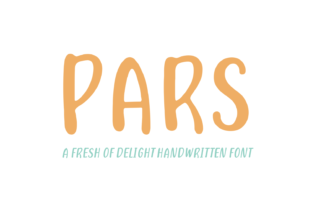
If you’ve been browsing font libraries lately, you may have come across Pars. It’s a fresh, clean handwritten typeface that comes in both regular and italic styles. The overall feel is soft, warm, and positive—almost like a friendly note from a colleague rather than a stiff corporate memo. That relaxed vibe is exactly why many people are drawn to it. But here’s the thing: a font that looks inviting doesn’t automatically work well for every project. I’ve seen designers, small business owners, and bloggers make the same mistakes with handwritten fonts like Pars, and those missteps can turn a charming design into a messy, hard-to-read distraction.
This article walks through the most common misunderstandings and practical oversights when choosing, using, or buying Pars. We’ll talk about what to watch out for, how those errors affect your results, and—most importantly—how to get the best out of this typeface without sacrificing clarity, professionalism, or usability.
Mistake #1: Treating Pars Like a Standard Body Text Font
One of the quickest ways to sabotage a project is to set an entire block of body copy in Pars and expect it to read smoothly. Yes, the font is clean and legible for a handwritten style, but it was never designed for long paragraphs. Its natural rhythm and slightly irregular strokes work beautifully for headlines, quotes, or short notes. However, when you force it into dense text blocks, readers tire quickly. Eye fatigue sets in, and the relaxed feeling you wanted turns into frustration.
I once had a client who used Pars for the full text of a one-page website describing their handmade candle business. The page looked friendly from a distance, but visitors bounced within seconds because they couldn’t scan for details like ingredients or shipping policies. The font’s charm worked against the need for quick readability.
Better Approach
Reserve Pars for shorter, high-impact content. Use it for headings, subheadings, pull quotes, or call-to-action lines. When you need body copy, pair Pars with a clean, neutral sans serif like Open Sans, Lato, or Karla. The contrast lets the handwritten warmth shine without overwhelming the reader. As a rule of thumb, if a block of text runs longer than two or three sentences, consider using a more conventional body font.
Mistake #2: Overlooking the Italic Versions
Pars comes with both regular and italic styles, yet too many users grab the regular weight and never explore the italic option. That’s a missed opportunity. The italic variant adds a subtle slanted flow that can imply motion, emphasis, or a more personal tone. By ignoring it, you lose a tool that could make your design feel more dynamic.
For example, if you’re designing a greeting card, placing the main message in regular Pars and a heartfelt closing line in italic creates a natural hierarchy. It adds nuance without needing extra bold weights (Pars doesn’t have bold, but that’s fine). The italic can also work well for captions or side notes where you want to gently separate secondary information.
What to Check Before Using Italic
First, test the italic at the sizes you plan to use. Sometimes italic handwritten fonts lose some legibility at very small sizes (below 14px). If your project includes fine print—like terms and conditions or small credits—the regular weight will be safer. Second, look at the spacing: the italic version may have tighter or looser letter forms, so manual kerning adjustments might be needed for headlines.
Don’t assume all italic styles are equally readable. Open the font, type a few words in italic, and zoom in. If the letters look cramped or too cursive-like, scale up the size or switch back to regular for that specific use case.
Mistake #3: Using Pars in Formal or Legal Contexts Without Testing
Pars has a soft, casual personality. That’s its superpower—and its limitation. Placing it on a formal invitation for a gala, a legal document, or a corporate annual report can send the wrong message. The relaxed feel contradicts the seriousness those materials demand. Even if you love the look, your audience may perceive it as unprofessional or careless.
I’ve watched a small business owner rebrand their entire law firm website with Pars, hoping to appear “approachable.” Instead, clients called to ask if the firm was a hobby project. The disconnect between the font’s vibe and the service’s gravity was jarring.
How to Decide If the Context Fits
Before committing to Pars, ask yourself: What emotion do I want the audience to feel? If the answer is “trust, authority, or urgency,” a handwritten font likely won’t help. If the answer is “friendly, warm, creative, or personal,” then Pars could be a perfect match.
Also consider your medium. A printed bookmark for a coffee shop? Pars works beautifully. A pitch deck for venture capitalists? Probably not. When in doubt, test the font on actual stakeholders and get honest feedback. A five-minute poll among trusted peers can save you a costly redesign later.
Mistake #4: Ignoring Size Spacing and Color Contrast
Handwritten fonts like Pars often have irregular spacing and stroke widths. That’s part of the handmade appeal, but it also means you need to be more careful about typographic fundamentals. Many users set Pars at the same point size and letter spacing they’d use for a Geometric sans, then wonder why the text looks uneven.
Common issues include:
- Letters appearing too tight, especially between “r” and “n” or “o” and “c”.
- Poor contrast on light backgrounds if the stroke weight is thin.
- Inconsistent leading (line height) causing awkward gaps between lines.
These problems affect how quickly people absorb your message. A user may not consciously notice the spacing, but they will feel that something is “off.” They’ll scroll past, click away, or simply not trust the content.
Practical Adjustments
For digital use, set Pars at a minimum of 18–22 points for headlines and 14–16 points for short snippets. Increase letter spacing slightly (by 1–2%) to prevent overlapping. Use a line height around 1.5 to give the letters breathing room. On backgrounds, avoid low-contrast combinations like grey on white or yellow on light beige. Dark warm tones (charcoal, deep brown, navy) against a white or cream background will preserve the font’s softness while keeping it readable.
Print designers should test both the regular and italic at the intended physical size. What looks charming on screen may become muddy on paper, especially if you’re printing on uncoated stock. Run a test page before ordering bulk prints.
Mistake #5: Choosing Pars Without Checking the License
Handwritten fonts are often sold under specific licensing terms. Some allow only personal use, while others cover commercial projects with restrictions. I’ve seen freelancers download Pars from a freebie site without verifying the license, then use it in a client’s logo—only to receive a takedown notice months later. That’s an expensive and embarrassing mistake.
Before you buy or download Pars, check the End User License Agreement (EULA). Look for answers to questions like:
- Can I use Pars in a logo for a business?
- Does the license cover embedding in apps, ebooks, or web fonts?
- Are there restrictions on the number of users or installations?
- Do I need a separate license for merchandise (t-shirts, mugs, etc.)?
If you’re designing for a client, include a line item in your contract that requires the client to purchase the correct license. Don’t assume your personal license covers their commercial use.
Better habit: As soon as you decide Pars is the right font for a project, open the license documentation and read it thoroughly. If anything is unclear, reach out to the foundry or marketplace seller. One quick email can prevent a legal headache later.
Putting It All Together: When Pars Shines
Despite these warnings, Pars is genuinely a lovely font—when used thoughtfully. It excels in social media graphics, blog post headers, product packaging for handmade goods, children’s book covers, personal stationery, and creative branding that leans warm and approachable. Its regular and italic pairing gives you just enough flexibility for hierarchy without needing a full family.
The key is to treat Pars as a deliberate design choice, not a default filler. Ask yourself: Does this application enhance the message or distract from it? If you’re leaning toward the latter, step back and adjust. Pair it with a simple background, keep the copy short, and let the font’s natural flow do the work.
By avoiding the common mistakes I’ve outlined—overusing it in body text, ignoring the italic, choosing the wrong context, neglecting spacing and contrast, and skipping license checks—you’ll set yourself up for a polished, effective result. Your audience will feel the positive, relaxed vibe you intended, and they’ll actually stay to read what you wrote. That’s the whole point.