Saphira: Evaluating a Modern Calligraphy Font by Naldy Studio
When selecting a typeface for a branding project, wedding suite, or social media campaign, the choice often comes down to finding a balance between personality and readability. Modern calligraphy fonts occupy a distinct space in typography: they offer the warmth of hand-lettering while providing the consistency expected of a digital font. Saphira, designed by Naldy Studio, is one such typeface that has attracted attention for its elegant strokes and contemporary feel. This article provides a balanced evaluation of Saphira, helping you determine whether it meets the specific needs of your project.
What Is Saphira?
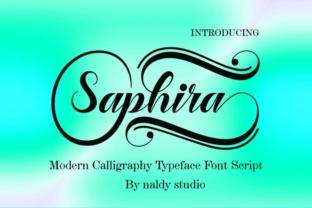
Saphira is a modern calligraphy font created by the type foundry Naldy Studio. It is characterized by fluid, connected letterforms that mimic the natural motion of a brush or nib pen. Unlike traditional copperplate scripts, which adhere to strict formal proportions, Saphira introduces a more relaxed rhythm, with varying stroke weights and subtle swashes. The font includes a full set of uppercase and lowercase letters, numerals, punctuation, and multilingual support, making it suitable for a range of applications. Naldy Studio designed Saphira to work well at both display sizes and smaller text settings, though its primary strength lies in headings and short-form copy.
Why Consider Saphira?
Several qualities make Saphira an appealing choice for designers, business owners, and content creators. Understanding these factors can help you decide if it fits your workflow.
- Aesthetic versatility: Saphira straddles the line between formal and casual. Its loops and flourishes are restrained enough for professional branding, yet lively enough for creative invitations.
- Readable letterforms: Many calligraphy fonts sacrifice legibility for flair. Saphira maintains open counters and clear letter distinctions, reducing the risk of misinterpretation in headlines or logos.
- Contextual alternates: The font includes stylistic alternates and ligatures, allowing you to adjust the appearance of certain letter combinations. This feature adds flexibility without requiring additional software.
- Studio reputation: Naldy Studio has a track record of producing polished display fonts. Their attention to kerning and curve consistency carries over into Saphira, reducing manual adjustment time.
Benefits of Using Saphira
Beyond initial impressions, Saphira offers practical advantages for everyday design work.
Consistent Stroke Variation
One common pitfall in digital calligraphy is uneven stroke contrast, where thick and thin lines appear mechanical. Saphira’s vector paths are crafted to mimic natural ink flow, with transitions that feel organic rather than programmed. This consistency is particularly valuable when scaling the font for large prints or high-resolution screens.
Cross-Platform Compatibility
Saphira is available in common formats—typically OTF, TTF, and WOFF—which means it integrates smoothly with major design software such as Adobe Illustrator, Photoshop, Canva, and web development tools. You can use it on both macOS and Windows without encountering missing character issues, provided you install the appropriate file.
Time Efficiency for Non-Designers
If you are a business owner or marketer without deep typography training, Saphira’s pre-made ligatures and alternate characters reduce the need to manually adjust spacing or substitute glyphs. The font comes with a basic character map that is straightforward to navigate in most applications.
Tradeoffs and Considerations
No font is universally perfect. Evaluating Saphira honestly means acknowledging areas where it may fall short for certain users.
Licensing and Cost
Saphira is a premium font, sold through platforms such as Creative Market, Fontspring, or the Naldy Studio website. While the cost is moderate compared to custom lettering, you will need to purchase a license for commercial use. Free alternatives exist, but they often lack the polish and glyph variety that Saphira offers. If your budget is tight, this may be a deciding factor.
Limited Extended Character Sets
Although Saphira supports multiple languages, its character set may not cover the full range of diacritics or special symbols needed for Central European, Cyrillic, or Asian scripts. If your project requires extensive multilingual typesetting, you may need to supplement with a secondary font or explore alternatives.
Not Suitable for Long Body Text
Modern calligraphy fonts, including Saphira, are designed primarily for display use. At very small sizes (below 12 points), the delicate hairlines and swashes can become indistinct or muddy, especially on uncoated paper or lower-resolution screens. For long paragraphs or dense editorial content, a serif or sans-serif font would be more readable.
Learning Curve with Alternates
While contextual alternates are a benefit, accessing them can require familiarity with your software’s glyph panel. Some users find the process of substituting characters tedious. If you prefer a “set it and forget it” approach, Saphira’s default forms are still attractive, but you may not fully leverage its potential.
Scenarios Where Saphira Is a Strong Fit
Certain projects align naturally with Saphira’s strengths. Recognizing these situations can help you deploy the font effectively.
- Wedding and event invitations: The font’s elegant curves and swashes complement formal stationery, save-the-date cards, and menus. It pairs well with subtle floral motifs or metallic foil accents.
- Social media graphics: Instagram quotes, Pinterest pins, and Facebook cover images benefit from Saphira’s readability at medium display sizes. Its visual warmth can increase engagement in lifestyle and fashion contexts.
- Product packaging: For boutique products—such as candles, skincare, or gourmet foods—Saphira adds a handmade touch that suggests quality and attention to detail.
- Brand logos and wordmarks: Small businesses and solopreneurs seeking a distinctive yet legible logotype may find Saphira a cost-effective alternative to custom lettering. The built-in alternates help avoid a generic look.
Scenarios Where Alternatives May Be Worth Considering
No tool fits every job. If your requirements tilt toward technical precision or extreme versatility, other fonts might serve you better.
- Corporate or legal documents: For contracts, reports, or official correspondence, Saphira’s decorative nature is inappropriate. Stick with neutral serif or sans-serif families like Noto Serif or Inter.
- Large-scale signage: At very large sizes (over 100 points), the fine hairlines in Saphira may become visually thin. Heavy calligraphy options like Bickham Script or commercial alternatives with bolder weights could be more dependable.
- Budget-constrained projects: If you need a calligraphy aesthetic without upfront cost, open-source fonts such as La Belle Aurore or Dancing Script offer similar vibes, though with less polish and fewer alternates.
- Web performance optimization: For websites where every kilobyte matters, Saphira’s file size may be larger than necessary. Consider using variable fonts or subsetting to reduce load times, or choose a lighter alternative.
Practical Decision-Making Insights
To determine whether Saphira aligns with your goals, work through a short evaluation process tailored to your project.
- Define the primary use case. Identify whether the font will appear in headlines, logos, invitations, or small text. For headlines and short phrases, Saphira is a strong candidate. For body copy, look elsewhere.
- Assess your audience. Consider the expectations of your readers or customers. A traditional audience may appreciate Saphira’s elegance, while a tech-savvy audience might view it as overly decorative.
- Test with real content. Download the trial version (if available) and set your actual copy in Saphira. Pay attention to spacing, kerning, and how the alternates interact with your specific words. A font that looks beautiful in a specimen sheet may behave differently with your particular letter combinations.
- Check compatibility with your existing brand assets. Place Saphira next to your primary logo, color palette, and imagery. Does it harmonize or clash? The font’s warm personality can enhance organic brands but may feel out of place in minimalist or industrial aesthetics.
- Calculate licensing costs against the project budget. Factor in the number of uses (e.g., single project, web use, or print run) and compare with the license terms. If the cost is prohibitive, explore the alternatives mentioned earlier.
Final Considerations
Choosing a font is rarely a matter of “better” or “worse”—it is about fit. Saphira from Naldy Studio occupies a specific niche: elegant yet approachable, decorative yet readable. It excels in contexts where you want to convey craftsmanship and personality without overwhelming the content. However, its premium cost and limitations in long-form or small-scale settings mean it is not a universal solution. By evaluating your project’s specific needs, audience expectations, and technical constraints, you can make an informed decision about whether Saphira deserves a place in your typographic toolkit.
For designers who value fluid lettering and need a dependable modern calligraphy font, Saphira offers a polished option that balances tradition with contemporary usability. Take the time to test it with your own materials, and weigh its strengths against the tradeoffs discussed above. That process will tell you more than any feature list alone.