ArtCore and the ArtCore Font: Integrating Distinctive Typography into Your Creative Workflow
Typography often determines whether a design lands or gets overlooked. The right typeface brings clarity, mood, and personality to any project—whether it is a brand identity, a presentation, a website, or printed collateral. ArtCore, developed by Gblack Id, is a typeface that occupies a specific and useful space in that landscape. It is not just another font to add to your collection; it is a tool designed with intentional structure and visual character. Understanding what ArtCore offers and how it fits into a broader creative process can help you use it more effectively, whether you are a designer, a marketer, a small business owner, or someone who simply values clear and compelling communication.
This article walks through what ArtCore is, where it belongs in your workflow, how it interacts with other tools and decisions, and practical ways to implement it for consistent, high-quality results. The goal is to help you integrate this typeface smoothly into your own projects, without hype or unnecessary complexity.
What ArtCore Is and Why It Matters in a Workflow Context
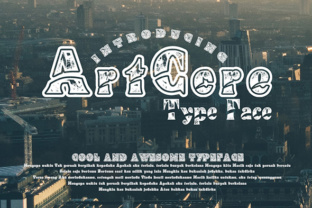
ArtCore is a display typeface created by Gblack Id. It carries a geometric, modern aesthetic with distinct letterforms that balance readability with a strong visual identity. While many fonts prioritize either function or flair, ArtCore attempts to bridge the two. Its structure makes it suitable for headlines, logos, posters, and other applications where the type itself carries communicative weight.
In a practical sense, a typeface like ArtCore is not something you use for body text in a lengthy report. Its strength lies in moments where you need to capture attention quickly—headings, hero sections, branding elements, or short-form content that benefits from a bold, recognizable form. This makes it a strategic asset in your typography toolkit, not a default choice for every situation.
Understanding this distinction is key. When you treat ArtCore as a deliberate component of your design system rather than an afterthought, you can plan around its strengths. That is where workflow thinking enters. Instead of picking a font at random, you assess your project goals, audience, and medium first. Then you decide whether ArtCore fits the brief.
Where ArtCore Fits in the Creative Process
Typography decisions happen at multiple points in a project. ArtCore can be useful before, during, and after the main creative work, depending on how you structure your process.
Before the Project: Planning and Preparation
When you are in the planning phase, you define the visual direction. This is the time to consider whether a geometric display font like ArtCore aligns with your message. If your project requires a modern, confident, or slightly industrial tone, ArtCore is worth testing. At this stage, you are not yet committing to final files. You are exploring options, comparing it against other typefaces, and evaluating how it behaves at different sizes and in different contexts.
Preparation also means checking technical compatibility. If you are working in design software like Adobe Illustrator, Figma, or Sketch, confirm that ArtCore installs cleanly and that all glyphs and weights you need are present. If you are handing off files to a developer or a print shop, verify that licensing covers your use case. Gblack Id typically provides clear licensing terms, so read those before you build your project around the font.
This upfront check saves time later. Nothing derails a workflow like discovering halfway through production that a font lacks a required character or that the license does not cover web embedding.
During the Project: Implementation and Integration
This is where ArtCore does its primary work. Using it in headlines, call-to-action buttons, or brand marks requires attention to spacing, contrast, and hierarchy. Because ArtCore has a strong visual presence, it pairs best with simpler, more neutral typefaces for body content. A common approach is to use ArtCore for display elements and a clean sans-serif or serif for paragraphs. That contrast creates a clear visual hierarchy that guides the reader naturally.
When you place ArtCore in a layout, pay attention to kerning and tracking. Display fonts often need manual adjustment to look balanced, especially at larger sizes. Most design tools let you fine-tune letter spacing. Take the time to do that. It is the difference between a polished piece and one that looks slightly off.
Also consider color and background. ArtCore's geometric shapes work well on solid backgrounds, gradients, and even over images if you add sufficient contrast. Testing different color combinations early in the design phase helps you avoid last-minute revisions.
After the Project: Quality Control and Consistency
Once the design is complete, review how ArtCore performs across all deliverables. If you are producing multiple assets—social media graphics, web pages, print materials—check that the typeface renders consistently. Different platforms may handle font rendering differently, especially on the web. For digital use, consider converting key elements to vector outlines or using web font formats to preserve appearance.
Quality control also means verifying that ArtCore aligns with your brand guidelines. If you are building a system that will be used by multiple people, document how and where ArtCore should be applied. Specify sizes, weights, pairings, and spacing rules. This keeps the implementation consistent even when different team members or collaborators work on the project.
How ArtCore Interacts with Other Tools and Resources
No typeface exists in isolation. ArtCore works within an ecosystem of software, platforms, and other design assets. Understanding these interactions helps you avoid friction and get better results.
Design Software
ArtCore installs like any standard font and works across major design applications. In vector-based tools like Illustrator or Affinity Designer, you can fully control outlines, which is useful for custom lettering or logo work. In layout tools like InDesign, you can define paragraph and character styles that reference ArtCore, making it easy to apply consistent formatting across multi-page documents. In prototyping tools like Figma, the font behaves predictably as long as it is installed locally or shared via a team library.
Web Platforms
If you plan to use ArtCore on a website, you need to handle web font licensing and hosting. You can self-host the font files or use a service that supports them. CSS font-face declarations should include proper formats (woff2, woff) for broad browser compatibility. Because ArtCore is a display font, use it sparingly on the web—typically for headings or hero text—to maintain fast load times and clear readability on all screen sizes.
Print Production
For print, ArtCore works well at larger sizes. At smaller point sizes, its geometric details may become less legible, so test it at the actual output size before finalizing. If you are working with a print vendor, embedding the font in your PDF or providing the font file along with your artwork ensures the output matches your intent. Always proof physical samples if the project is high-stakes.
Collaboration and Handoff
When sharing files with other designers, developers, or clients, include ArtCore in your asset package or specify where it can be obtained. If collaborators do not have the font installed, their systems will substitute a placeholder, which can cause layout shifts and misunderstandings. A simple handoff checklist that includes font files, licensing details, and usage notes saves everyone time.
Practical Implementation Tips for Smooth Integration
Getting the most out of ArtCore does not require a complex process. A few practical habits help you integrate it naturally into your workflow.
- Test early. Before committing to ArtCore for a full project, create a few mockups with your actual content. This reveals how the typeface handles real-world text lengths, special characters, and layout constraints.
- Pair intentionally. Avoid pairing ArtCore with another highly decorative font. Stick to one display font and one neutral body font. This keeps the design clean and focused.
- Define a hierarchy. Decide in advance which elements get ArtCore usage—headlines, subheadings, or accent text. Then apply it consistently across all assets. This builds recognition and reduces decision fatigue.
- Watch your spacing. Display fonts often require more generous margins and padding around them. Give ArtCore room to breathe. Crowding it with other elements diminishes its impact.
- Document your decisions. If you are working on a team or for a client, record why you chose ArtCore and how it should be used. This becomes a reference point for future projects and prevents drift.
Workflow Examples Across Different Use Cases
To make these ideas concrete, here are a few scenarios where ArtCore fits naturally into a practical workflow.
Brand identity project. You are designing a visual identity for a small tech startup. The brand needs to feel modern and confident. During the research phase, you identify ArtCore as a potential primary display font. You test it in logo variations, website mockups, and business card layouts. It pairs well with a clean sans-serif like Inter or Roboto for body text. You document the pairing in a brand guideline, including minimum sizes and color specifications. The result is a cohesive system that the client can implement across digital and print touchpoints.
Marketing campaign. A team is launching a new product and needs social media graphics, email headers, and a landing page. You choose ArtCore for the campaign headlines because it stands out in a crowded feed. You create a template in your design tool with ArtCore pre-applied to the title layer. This speeds up production and ensures every graphic maintains visual consistency. The font is also embedded in the email template and used for the hero section of the landing page. Because you planned ahead, all assets align without rework.
Personal project or portfolio. A freelancer is redesigning their portfolio site. They want a bold, memorable look. ArtCore becomes the typeface for the site title and section headings. They pair it with a readable body font and test responsiveness across devices. Because they self-host the font and limit it to a few key elements, the site loads quickly and looks distinctive without overwhelming the content. The portfolio becomes a practical demonstration of their design thinking.
Long-Term Use and Organization
If you plan to use ArtCore repeatedly—across multiple projects or as part of a brand system—organize it properly. Keep the font files in a central, backed-up location. Store the license documentation alongside the files. If you manage fonts with a tool like FontBase, Suitcase Fusion, or RightFont, tag ArtCore with relevant metadata such as style category, usage notes, and project associations.
Over time, a well-organized font library saves you from searching for files or wondering about licensing terms. It also makes it easier to share approved typefaces with collaborators without duplication or confusion.
Consistency matters more than frequency. You do not need to use ArtCore in every project. Use it when it serves the message and the medium. By treating it as a deliberate option rather than a default, you maintain the quality and impact of your work.
Observations on Quality and Usability
ArtCore by Gblack Id shows attention to structural detail. The letterforms are balanced, and the geometric consistency gives it a cohesive look across different weights if multiple weights are available. In practice, it reads well at medium to large sizes, which is where display fonts earn their value. The usability is straightforward—standard install, standard application, predictable behavior in common design tools.
What makes it useful in a workflow is not just the design of the typeface itself, but how you choose to position it. When you plan for it, test it early, and document its role, ArtCore becomes a reliable component rather than an experimental choice. That reliability matters when you are working under deadlines, managing client expectations, or building systems that others will use.
Typography is ultimately about communication. ArtCore gives you a clear, modern voice when you need it. The rest is up to your process.